|
|
|
|
 |
 |
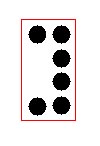 |
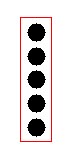
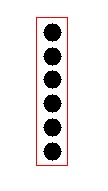
If you are needing to hook a PS/2 mouse port to your motherboard, there are a few things you need to know. First off, how many pins are on the connector on your board? Some of the more common are 5 pin, 6 pin, and 8 pin configurations. They will look like this:
|
|
|
|
|
|
|
|
The manual that came with your motherboard will tell you the pin configuration or pinouts for your board. Most companies have the pins on the board in different configurations. Here is some examples. The first one comes from PC Chips website.
|
Pin 3--> . <-- Pin 4 Pin 5--> . . <-- Pin 6 Pin 7--> . . <-- Pin 8 |
2 - Ground 3 - Open 4 - Mouse Data 5 - Open 6 - Open 7 - Open 8 - V.C.C. |
OR:
| 1. Data
2. Not Used 3. Ground 4. VCC 5. Clock |
Here is a couple of examples from Soyo USA's website:
 |
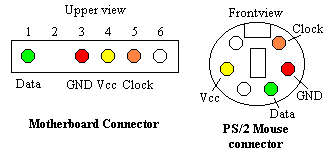 |
Once you learn what the pinouts are, then you need to make sure the
port is correct.
The port that is on the back of your computer needs to be setup as
follows:
PS/2 MOUSE DIN ASSIGNMENTS
 1 DATA ?? MOUSE Data 2 N/C Not connected 3 GND ---- GROUND 4 VCC ? Power , +5 VDC 5 CLK ? MOUSE CLOCK 6 N/C Not connected |
I hope this has given you some ideas for hooking up a PS/2 mouse
port. If not, then please email me and I will try to help you.